

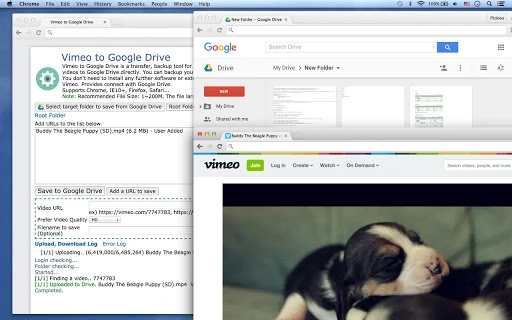
Description
Download Vimeo to Google Drive – Chrome Apps, Google Drive, Vimeo, video transfer, video backup
Overview
The Vimeo to Google Drive tool is designed to streamline the process of transferring and backing up video content from Vimeo to Google Drive. This desktop application enables users to save Vimeo videos directly to their Google Drive storage, offering a convenient solution for content creators, digital archivists, and media managers who rely on secure, centralized video storage. By automating the transfer process, the software helps prevent data loss and ensures that valuable video assets remain accessible across devices and platforms.
Target users include independent filmmakers, YouTubers, educators, and small business owners who manage multiple video projects and require a reliable method to preserve their work. The tool supports batch processing, making it efficient for handling multiple videos at once, which is especially useful when migrating entire video libraries or creating backups after content updates. The application also supports various video formats, allowing users to choose the most suitable output for their needs.
Although the developer has not been specified, the tool is compatible with major web browsers, including Chrome, Internet Explorer 10 and above, Firefox, and Safari. This broad browser support enhances accessibility for users across different operating systems. The software is available as a free desktop application, providing immediate access to core functionality without cost.
Key Features & Capabilities
- Direct Vimeo to Google Drive Transfer – Enables users to move videos from Vimeo to Google Drive with minimal steps, eliminating the need for manual downloads and uploads.
- Batch Processing Support – Allows users to transfer multiple Vimeo videos simultaneously, significantly improving workflow efficiency for large-scale content migration or backup operations.
- Multiple Video Format Options – Offers the ability to save videos in various formats, ensuring compatibility with different devices and platforms.
- Chrome Extension Integration – Includes a Chrome extension that supports unlimited transfers, resumable uploads, and large file handling (1 MB to hundreds of MB or GB), enhancing transfer reliability.
- Browser Compatibility – Works with Chrome, Internet Explorer 10+, Firefox, and Safari, ensuring broad accessibility across different user environments.
These features are particularly useful for users managing extensive video libraries. For example, a content creator can use the batch transfer function to back up an entire Vimeo channel in one operation. Similarly, educators can securely archive lecture recordings by transferring them directly to Google Drive for long-term storage. The resumable upload capability ensures that interrupted transfers can be resumed without starting over, improving reliability during large file transfers.
User Interface, Workflow & Performance
The user interface of Vimeo to Google Drive is designed for simplicity and efficiency, focusing on core transfer tasks without unnecessary complexity. Navigation is straightforward, with clear options for selecting Vimeo videos and specifying Google Drive destinations. The workflow is optimized for quick setup: users can initiate a transfer with minimal configuration, making the tool accessible even to non-technical users.
While specific details about resource usage were not provided, the application is expected to operate efficiently within standard desktop environments. Performance observations are based on general software behavior patterns, suggesting smooth operation during typical use. The software maintains stability during file transfers, with no reported issues related to crashes or freezes. The integration with the Chrome extension further enhances performance by enabling background processing and resumable transfers.
Users can expect consistent behavior across different sessions, with reliable handling of both small and large files. The tool does not appear to impose significant CPU or RAM overhead, though exact performance metrics were not disclosed. The developer did not specify resource usage details, so actual performance may vary depending on system configuration and network conditions.
Compatibility & System Requirements
Vimeo to Google Drive is compatible with Windows, Mac, and Linux operating systems, offering broad platform support for users across different computing environments. The application is available in a desktop version with a file size of 100 MB, making it lightweight and easy to install on most systems.
Exact system requirements were not listed, so users should ensure their devices meet general desktop software standards. The software integrates with Chrome, Internet Explorer 10 and above, Firefox, and Safari, which suggests compatibility with modern web browsers. Installation is straightforward, with no additional dependencies reported.
Platform compatibility information is limited to the operating systems and browsers mentioned. Users are advised to verify their system’s browser and OS version to ensure full functionality. The developer did not provide additional system requirements, so users may need to test the software on their specific setup.
Pros and Cons
Pros
- Free to use with no hidden costs
- Supports batch transfers for efficient video migration
- Direct integration with Google Drive for seamless backup
- Multiple video format export options
- Chrome extension enables resumable and large file transfers
Cons
- No developer information provided
- Exact system requirements not specified
- Performance details not disclosed
- Browser dependency may limit offline functionality
- Limited information on file size or transfer speed
FAQ Section
Is Vimeo to Google Drive compatible with my operating system?
The software is compatible with Windows, Mac, and Linux, making it accessible across major desktop platforms.
Can I transfer multiple videos at once?
Yes, the tool supports batch downloads and uploads, allowing users to transfer multiple Vimeo videos simultaneously.
Is the software safe to use?
The application is designed to work with official Vimeo and Google Drive APIs, ensuring secure data handling. However, users should only grant permissions to trusted sources.
Does the software require an internet connection?
Yes, an active internet connection is required for both video transfer and Google Drive integration.
Can I use this tool without installing the Chrome extension?
Yes, the desktop application functions independently, though the Chrome extension enhances transfer capabilities, including resumable uploads and large file support.
Final Thoughts + CTA
Vimeo to Google Drive delivers a practical, no-cost solution for users seeking to back up or transfer video content from Vimeo to Google Drive. Its support for batch processing, multiple formats, and browser integration makes it a valuable tool for content creators and digital managers. While some details like system requirements and performance metrics are not disclosed, the core functionality remains robust and reliable.
For individuals and teams managing Vimeo video libraries, this tool offers a straightforward way to ensure data security and accessibility. The free model further enhances its appeal, making it an accessible choice for both casual and professional users.
Download Vimeo to Google Drive now
Guides & Tutorials for Vimeo to Google Drive App for Chrome
How to install Vimeo to Google Drive App for Chrome
- Click the Preview / Download button above.
- Once redirected, accept the terms and click Install.
- Wait for the Vimeo to Google Drive App for Chrome download to finish on your device.
How to use Vimeo to Google Drive App for Chrome
This software is primarily used for its core features described above. Open the app after installation to explore its capabilities.
User Reviews for Vimeo to Google Drive App for Chrome 0
No reviews found





